Secret Content
Hide blocks and inline text from shared users while keeping them visible to you.
Overview
Secret content lets you include notes, annotations, or sensitive information in an entry that only you (the space owner) can see. Shared users won't see any indication that secret content exists — it's completely invisible to them.
There are two types of secret content: secret blocks (entire sections) and secret inline marks (spans of text within a paragraph).
Secret Blocks
A secret block is a container element that wraps one or more blocks. Everything inside the container is hidden from shared users.
Inserting a Secret Block
- Type
/secretin the editor and select Secret from the slash menu - Write your content inside the block
Secret blocks are only available to the space owner — the /secret option doesn't appear in the slash menu for shared users.
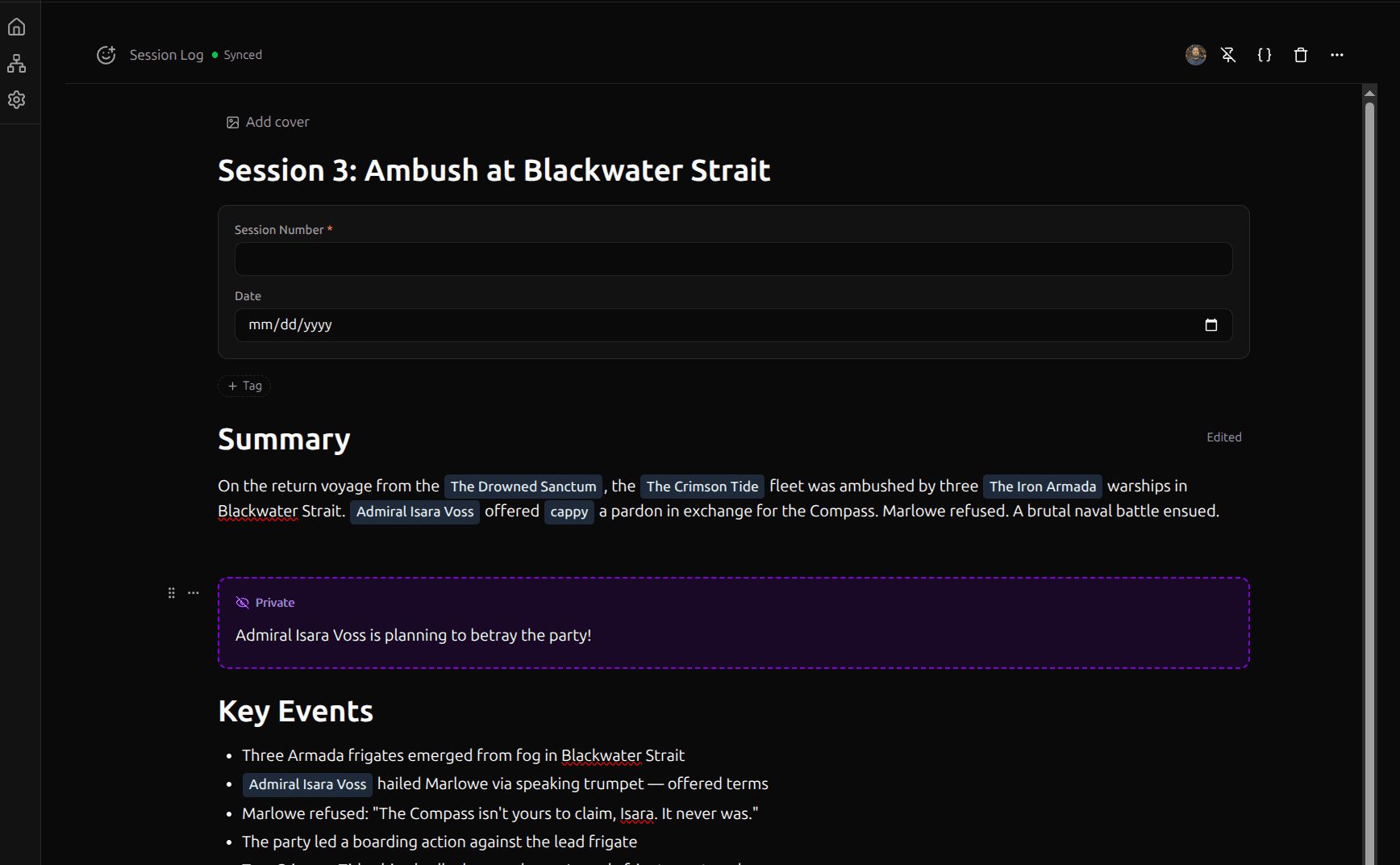
How They Look
For the owner: secret blocks render with a dashed purple border, an incognito (hat-and-glasses) icon, and a "Secret" label. The content inside is fully editable.
For shared users: the block is completely invisible. There's no placeholder, no "hidden content" message — it simply doesn't appear.
Secret Inline Marks
Secret inline marks hide a span of text within a paragraph. The surrounding text remains visible; only the marked span is hidden.
Applying a Secret Mark
- Keyboard shortcut: Select text and press Cmd+Shift+P
- Autoformat: Wrap text with triple pipes —
|||hidden text|||
How They Look
For the owner: secretly marked text renders with a dashed purple border and a light purple background, inline with the surrounding text.
For shared users: the marked text is invisible. The surrounding text flows together as if the secret span doesn't exist.
Security Model
Secret content is removed server-side for everyone who isn't a GM of the space. You and any other GM see and edit secret content normally; every other member has it stripped before it reaches their device — on the initial load, on every save, and on the live-collaboration layer.
- Read path: Secret blocks and marks are stripped from the entry on the server (via the
entries_safeview) before a non-GM's editor receives them, so they never reach the browser's DOM. - Collaboration path: For an entry that contains secret content, the live-collaboration document and its realtime channel are GM-only. A non-GM who opens such an entry gets the stripped content as read-only — they can't join the live session or edit it. (Without the read-only lock, editing stripped content would overwrite the hidden blocks on save.) Live co-editing of the non-secret parts of a secret-bearing entry, for non-GMs, is a planned follow-up.
This makes secret content a server-enforced boundary against other members of a shared space — suitable for GM secrets, draft sections, and annotations you don't want players to see. Among GMs the raw document is still shared during collaboration, so it relies on visual hiding there — it isn't a vault for secrets you must keep from co-GMs.
Mentions in Secret Content
@mentions inside secret content are still tracked as relations, but they're tagged as secret-origin. You'll see them in your Links section and Graph View with a purple incognito icon. Shared users never see these relations.
When to Use Secret Content
- GM secrets: Hide NPC motivations, stat blocks, or plot hooks inside shared entries — your players see the lore, you see everything
- Draft sections: Work on content secretly before making it visible (remove the secret mark when ready)
- Review annotations: Leave secret comments on a shared document
- Personal reminders: Add context that's only relevant to you