Relations & Linking
Connect entries with @mentions and manual links to build a knowledge graph.
Overview
Swashbuckler lets you connect entries together in two ways: mentions (inline references in the editor) and manual links (explicit connections added below the editor). Both types of connection appear in the Graph View and are tracked as relations between entries.
Mentions
Mentions are inline references to other entries, inserted directly in your writing.
Creating a Mention
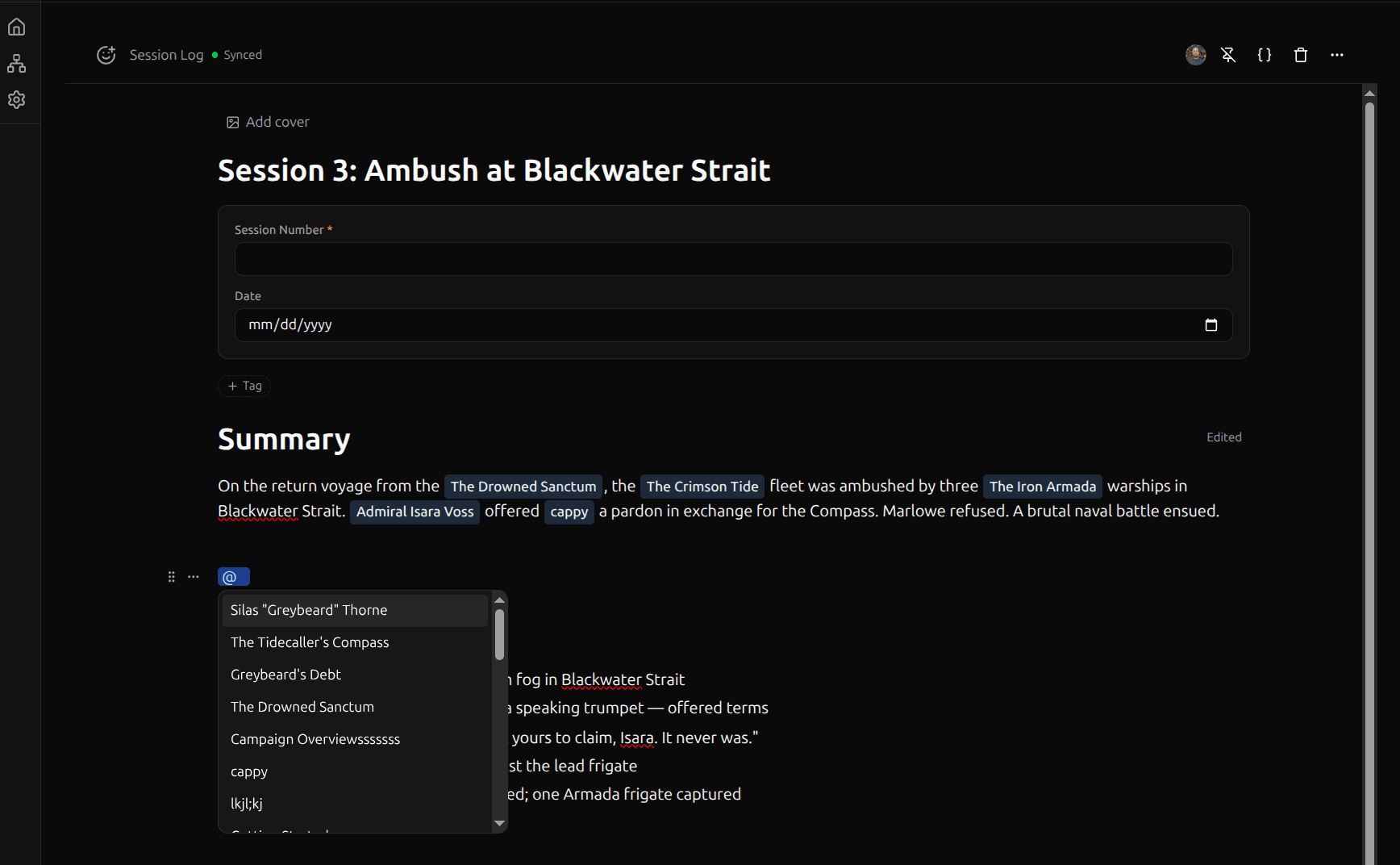
- Type
@in the editor to open the mention search dropdown - Start typing to filter entries — results are grouped by template
- Select an entry to insert the mention
The mention appears as a clickable chip in your text. Clicking it opens the referenced entry.
Creating New Entries from Mentions
If the entry you want to mention doesn't exist yet:
- Type
@and enter the name - Select Create new at the bottom of the dropdown
- Choose a template for the new entry
- The new entry is created and inserted as a mention in one step
Auto-Sync
Mentions are automatically synced as relations when the entry saves. Swashbuckler scans the editor content for mention nodes, compares them to existing relations, and creates or removes relations to stay in sync. This means:
- Adding a mention automatically creates a relation
- Removing a mention from the text automatically removes the relation
- You don't need to manage mention relations manually
Manual Links
Manual links are explicit connections between entries, managed in the Linked Entries section below the editor.
Adding a Link
- Open an entry in the editor
- Scroll below the editor content to the Linked Entries section
- Click the search field and type to find an entry
- Select an entry to add it as a link
Removing a Link
Click the remove button on a linked entry card in the Linked Entries section.
Auto-Link
Auto-link scans your editor content for text that matches existing entry titles and highlights it with a dotted underline.
Per-match actions: Hover over a highlighted match to see a popover with the entry name and options to:
- Convert — Replace this match with an
@mention - Dismiss — Hide this suggestion for the current session
Bulk actions: When matches are found, a badge appears in the tab bar row showing the match count. Click it to open a selection dropdown listing every match with checkboxes (all pre-checked). Toggle individual matches on or off, then click Convert All or Convert (N) to convert only the ones you want.
Toggle auto-link on or off from the ... menu in the editor header. The setting is remembered across sessions.
Mentions vs. Manual Links
| Mentions | Manual Links | |
|---|---|---|
| Where | Inline in the editor content | Linked Entries section below the editor |
| Creation | Type @ in the editor | Search and add in the Linked Entries section |
| Sync | Automatic — adding/removing a mention updates relations on save | Manual — you add and remove links explicitly |
| Graph View | Appears as a connection | Appears as a connection |
| Context | Shows where the reference appears in your writing | Standalone connection without inline context |
Both types of connection are treated equally in the Graph View and relation queries.
Relation Properties
Templates can have relation properties — structured fields that link to other entries. When you add a relation property to a template, each entry using that template can reference other entries through that property. These work alongside mentions and manual links to provide another way to connect entries.
See Entries & Templates for details on property types.
Mentions in Secret Content
If you use Secret Content (secret blocks, inline marks, or secret tabs), any @mentions inside secret content are still tracked as relations — but they're marked as secret-origin. This means:
- You (the space owner) see them in the Links section and Graph View, styled in purple with an eye-off icon
- Shared users never see secret-origin relations — they're completely hidden
If you later move a mention out of secret content into regular content, it automatically becomes a normal (visible-to-all) relation on the next save.
Backlinks
The Backlinks block shows all entries that link to or mention the current entry — the reverse of the Links section. Insert it from the slash menu (/backlinks) anywhere in your entry.
Each backlink shows the source entry's icon and title. Click a backlink to open that entry in a new tab. The block updates automatically as other entries add or remove references to the current one.
Viewing Connections
All connections (from mentions, manual links, and relation properties) are visualized in the Graph View. Each entry is a node, and each connection is an edge. You can explore your knowledge graph to discover patterns and navigate between related entries.